
How to AI Add Custom Furniture to Room A Practical Guide
Have you ever found the perfect sofa online, only to hesitate, wondering how it would actually look in your living room? We’ve all been there. Now, you can use AI to add custom furniture to room photos, turning that guesswork into a crystal-clear, photorealistic preview. It’s a game-changer for seeing exactly how a new piece will fit your space before you spend a dime.
Visualize Your Dream Space Before You Buy
That hesitation before a big purchase is completely normal. You're not just buying a piece of furniture; you're shaping how your home feels and functions. The age-old challenge was always connecting what you see on a website to the reality of your own room. This is where AI Interior Design steps in and changes everything.
Forget trying to eyeball dimensions or imagine color swatches. Now you can see it all in context. We're not talking about just dropping a flat, clipart-like image into a photo. This is sophisticated software that analyzes your room's specific lighting, perspective, and scale to integrate new items seamlessly and realistically.
The Modern Visualization Process
The entire process is designed to be straightforward, whether you're a homeowner planning a weekend project or a professional designer working with clients. At its core, it breaks down into a few simple stages: you upload a photo of your room, tell the AI what furniture you want and where, and then let it generate the final image.
This visual guide breaks down just how simple it is to add custom furniture with an AI tool.
As you can see, the path from an empty corner to a fully styled concept is really just a few clicks away.
Let's break down these core steps for clarity. The process behind platforms like Decor8 AI is designed to be intuitive from start to finish.
Core Steps to Virtually Add Custom Furniture
Stage | Objective | Key Action |
|---|---|---|
1. Upload & Prepare | Give the AI a clean slate of your room. | Upload a clear, well-lit photo of the space you want to furnish. |
2. Customize & Place | Tell the AI what you want and where it goes. | Describe the furniture, select from a library, or import a 3D model. Adjust its position and scale. |
3. Visualize & Refine | Generate a photorealistic image and make final tweaks. | Let the AI render the scene. Adjust lighting, shadows, and materials for a perfect match. |
Ultimately, the goal is to get a preview so realistic that it’s hard to tell it’s not a real photo.
Why This Technology Is Gaining Momentum
The buzz around AI Home Design tools isn't just hype; it's fundamentally changing how we approach interior design. The global market for AI in this space is booming, with projections showing it could hit USD 15,004.5 million by 2033. This incredible growth shows a real shift towards making high-end visualization tools accessible to everyone.
The benefits are clear and immediate:
Eliminates Costly Mistakes: You can test out that bold velvet armchair or oversized coffee table before you buy it, saving yourself from expensive buyer's remorse.
Speeds Up Decision-Making: No more agonizing. Quickly compare different chairs, rugs, or tables side-by-side in your own room to find the perfect fit.
Unlocks Creativity: Feel free to experiment with styles and custom pieces you might have been too nervous to try before. See it first, then decide.
By giving you a realistic preview, these tools empower you to design with total confidence. It’s less about hoping for the best and more about making smart, creative choices for your home. You can learn more about how to visualize your home before renovation and get started on your own projects.
Prepping Your Room for an AI Makeover
Getting a photorealistic result when you add custom furniture to a room photo with AI starts long before you upload anything. It all begins with the picture of your space. Think of it like a painter's canvas—the better the canvas, the better the final masterpiece. Your goal is to give the AI a crystal-clear understanding of the room's dimensions, lighting, and perspective.

This means the first, most crucial step is taking a great photo. Don't worry, you don't need professional gear; your smartphone is more than capable. The trick is to shoot during the day when natural light floods the room. This gives the AI the best information to work with for accurate colors and believable shadows.
Capturing the Perfect Room Photo
To make sure the AI can properly "read" the room, you need a clean, clear shot. The best way to do this is to stand in a corner or a doorway, which lets you capture as much of the space as possible in one go.
Here are a few tips from my own experience:
Go with Natural Light: Always avoid using your flash or harsh overhead lights. They create weird shadows and throw off the colors. A bright, overcast day is honestly perfect.
Shoot at Eye Level: Keep your phone straight and level, usually around chest height. If you angle the camera up or down, you'll distort the room's perspective, which makes it incredibly difficult for the AI to place furniture correctly.
Steady Your Shot: A blurry photo is the fastest way to get a disappointing result. Use both hands or, even better, a small tripod to keep everything sharp.
Find the Right Angle: A photo showing at least two walls and the floor gives the AI the best possible spatial information to work with.
Creating a Blank Canvas for Your Design
So, what if your room isn't an empty box? Most of the time, we’re redecorating a space that’s already full of stuff. This is where a good AI Room Design tool really proves its worth. Before you can add your dream furniture, you have to get rid of the old pieces.
Many platforms, including Decor8 AI, have a feature that lets you digitally erase things. You can just highlight the old sofa or coffee table, and the AI will intelligently fill in the background, rebuilding the wall and floor behind it. This step is absolutely critical for a clean visualization. If you want a more detailed look, you can learn how to use AI to remove furniture from a photo and get that perfect fresh start.
The ability to digitally clear a room is one of the most practical features of modern design AI. It allows you to experiment freely without the heavy lifting, turning any occupied space into a blank canvas ready for your ideas.
Sourcing Your Custom Furniture Inspiration
With your room prepped, it's time for the fun part: the furniture. Your inspiration can come from literally anywhere—a photo you saved from a catalog, a screenshot from Pinterest, or even a sketch you made yourself.
The AI is surprisingly flexible. You can upload a photo of a piece you love, or you can just describe it in detail. For example, instead of a generic prompt like "armchair," try something specific: "a mid-century modern armchair in teal velvet with tapered walnut legs." The more detail you provide, the closer the AI will get to what you're picturing in your head.
Placing and Customizing Your AI Furniture
Okay, with your room photo prepped and ready, it's time for the fun part—actually bringing your custom furniture into the scene. This is where your design ideas really start to come alive. You'll be adding your chosen piece to the digital space and tweaking it until it's just right. The whole process is surprisingly intuitive, whether you're working from a product photo or creating something from scratch with a description.
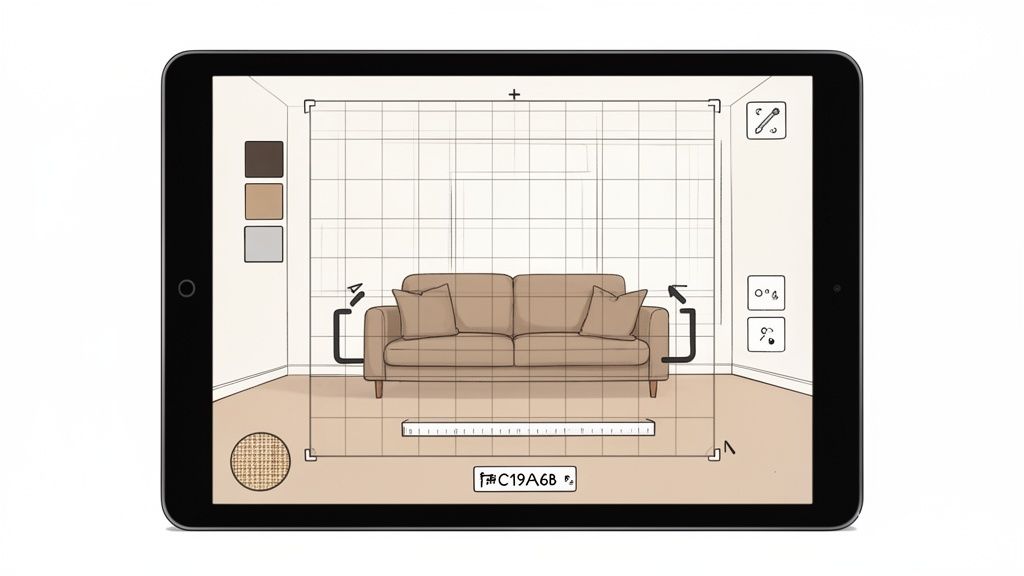
First things first, you need to get your custom item into the AI’s workspace. Most modern AI Room Design platforms offer two main paths. You can either upload a direct image of the furniture—like a picture from a retailer's website—or you can use a detailed text prompt to generate something brand new. Think something specific like, "a channel-tufted bouclé armchair with a curved back."
Positioning and Scaling for a Perfect Fit
After your furniture appears in the room, the next job is to get its position and size just right. This is where the AI's grasp of perspective is a lifesaver. You’ll usually find a simple drag-and-drop interface that lets you slide the object around the virtual floor plan until it feels like it’s in the right spot.
But making it look real is about more than just location; scale is everything.
Adjusting Dimensions: Look for scaling handles to resize the furniture. You want it to look proportional to other elements in the room, like the height of a window or the width of a doorway.
Rotating the Object: Don't forget to rotate the item on its axis. A slight turn can make a piece look much more natural and integrated, rather than just plopped into the scene.
Checking Proportions: Take a moment to step back and look at the whole picture. Does that armchair overwhelm the corner? Is the coffee table too low for the sofa?
Nailing these details is what truly sells the illusion and makes the new piece look like it was there all along.
Matching Materials and Colors with Precision
This is where the real magic happens when you ai add custom furniture to room designs: tweaking materials and colors with incredible precision. We're talking way beyond just picking "blue" or "wood." Advanced platforms give you a level of detail that ensures your new furniture blends seamlessly with your existing decor.
For instance, you can often change materials with a simple text command, like "change upholstery to a dark gray tweed." But the color matching is where things get really impressive. Many tools now connect with major paint brand libraries, allowing you to pick a specific shade from Benjamin Moore or Sherwin-Williams.
For designers, the killer feature is often the ability to input a specific hex code. If you're working with a brand palette or need to match a specific accent color, you can just type in its code (like #4B5320 for Army Green) for a perfect match. It ensures complete color harmony.
This level of control makes the final image feel genuinely bespoke. As you explore the right tools for your projects, remember to check out the best AI tools for 3D modeling, which can seriously speed up your workflow. For developers wanting to build this kind of functionality into their own applications, Decor8 AI provides solid documentation on implementing custom furniture placement via API.
This technology is already making waves in the real world. The global smart furniture market was valued at USD 960 million in 2025 and is expected to hit USD 3,810 million by 2034. This boom is powered by the kind of tech integration that AI Home Décor tools help us visualize. In retail, augmented reality has already been shown to slash product return rates by up to 25%—a powerful testament to how much accurate visualization matters.
Nailing the Details for a Flawlessly Real Look
Just dropping a piece of furniture into a photo is the easy part. The real magic happens when you make it look like it's actually in the room. This is where we separate a basic cut-and-paste job from a truly photorealistic render that convinces even a skeptical eye.
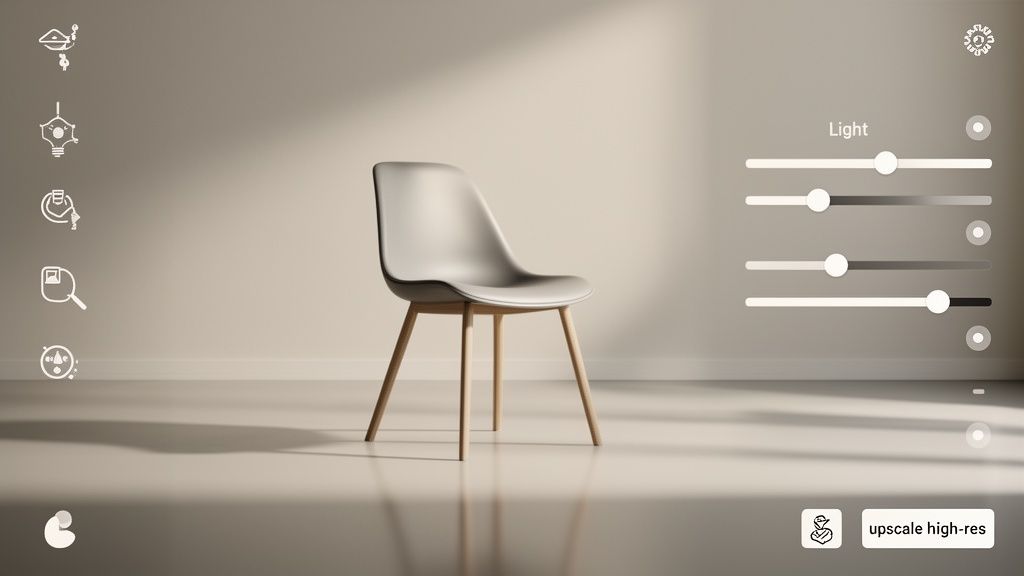
This is where sophisticated AI Virtual Staging platforms really shine. They do more than just place an object; they read the entire scene. The software is smart enough to detect the light sources in your original photo—everything from a bright, sunny window to the warm glow of a desk lamp.
Based on that analysis, the AI automatically casts shadows from your new furniture that look completely natural. A sofa near a large window will throw a soft, diffused shadow, while a chair directly under a ceiling light will cast a sharper, more defined one. This takes care of the trickiest part of the process, giving you a believable starting point in seconds.
Mastering Light and Reflections
Even with great automatic shadows, you'll want to jump in and fine-tune the lighting to get it perfect. The last thing you want is for your new piece to look artificially bright or oddly dark compared to everything else in the room.
You’ll usually have granular control over a few key settings:
Ambient Light: This lets you tweak the overall brightness, making sure the new item blends in seamlessly.
Shadow Intensity: You can soften or deepen the shadows to better match the existing light in the space.
Reflections: This is a huge one. For rooms with glossy floors, glass tables, or mirrors, the AI can often generate realistic reflections of your new furniture. It's a small detail that makes a massive impact.
I've found that getting the lighting right is 80% of the battle. It’s the subtle interplay of light and shadow that truly tricks our brains. A few minor adjustments here can make all the difference between "looks fake" and "wow, is that real?"
When you ai add custom furniture to room designs, these lighting controls are your secret weapon for creating a cohesive, believable image.
Enhancing and Exporting Your Final Image
Once you’re happy with the lighting, shadows, and reflections, there’s one last step: making sure the image quality is top-notch. Most professional design tools have a built-in upscaler. This uses AI to boost the resolution and sharpness of your final render, all without making it look blurry or pixelated.
This is non-negotiable for any professional work:
Real Estate Listings: You need crisp, high-resolution photos that pop online.
Client Presentations: Designers depend on polished visuals to get buy-in for their concepts.
Marketing Materials: Whether for a brochure or an Instagram post, high-quality images are a must.
After upscaling, you're ready to export the final, high-resolution image. You can learn more about how to upscale your interior design photos for that professional finish. The result is a photorealistic visual ready for your mood board, client pitch, or property listing, proving that your design idea not only works in theory but looks incredible in practice.
Pro Tips and Real-World Applications
Once you get comfortable with the fundamentals, the real fun begins. These AI design platforms are so much more than just a tool for swapping out a sofa—they're powerful enough for full-scale visualizations and can even be plugged directly into a business. It’s genuinely changing the game for designers, real estate agents, and even ambitious homeowners.
Beyond the Basics: Pushing the Creative Envelope
Let’s talk about some of the more advanced features that really open things up. For instance, have you ever found the perfect room on Pinterest and wished you could just drop that vibe into your own space? Many AI Interior Design tools now let you do exactly that. You can upload a reference image, and the AI will analyze its style—the colors, the furniture types, everything—and apply it to your room. It's a ridiculously fast way to audition completely different aesthetics.
Another one of my favorite features is sketch-to-render. This feels like magic. An architect or designer can literally upload a quick, rough sketch of a custom piece of furniture, and the AI will interpret it, turning that doodle into a photorealistic model within your room. It’s an incredible bridge from a raw idea to a tangible concept.
Taking AI Pro: Business Workflows and Integration
For businesses, this is where the technology gets really interesting. The ability to integrate AI design tools into your own website or app using APIs and SDKs is a massive leap forward. A platform like Decor8 AI, for example, provides a Virtual Staging API and developer kits for languages like Python and JavaScript.
This means a developer can build a system to ai add custom furniture to room photos automatically. Think about an online furniture store where a customer can upload a photo of their living room and instantly see how that specific armchair or coffee table would look. This isn't just a gimmick; it’s a powerful sales tool.
This kind of integration is quickly becoming a competitive edge. It’s not just about showing a picture; it’s about creating a personalized, interactive shopping experience that builds buyer confidence and helps slash return rates.
The numbers back this up. The AI design market is exploding, with projections showing it will grow from US$20.085 billion in 2025 to a staggering US$60.654 billion by 2030. It's no surprise that 66% of industry leaders expect AI to be a central part of their business very soon, a trend detailed in this full analysis of the AI design market.
And once you’ve perfected your virtual design, a practical guide to custom furniture can be the perfect next step to understand what it takes to bring that digital concept into the real world.
Frequently Asked Questions
Diving into AI Room Design tools often sparks a few questions, especially when you're trying to get that perfect, photorealistic result. Let's walk through some of the most common things people ask when they first start to ai add custom furniture to room photos.
Can I Use an Item from a Store Website?
Absolutely. In fact, this is one of the most powerful ways to use the technology. Just find a good, clear product photo from a retailer's website—the best ones usually have a simple, neutral background.
Once you have the image, you can upload it directly. The tool will automatically isolate the furniture, allowing you to position, resize, and rotate it in your room. You can even take it a step further with a text prompt like, "place this sofa and change its fabric to a dark gray tweed."
What If My Original Room Photo Has Poor Lighting?
A bright, well-lit photo is always the best starting point, but don't worry if yours isn't perfect. Modern AI is pretty smart about handling less-than-ideal lighting conditions. The software actually analyzes the light sources and shadows already in your photo to make sure the new furniture fits in naturally.
If your room is especially dark, some tools even let you adjust the overall lighting of the scene before adding anything new. The AI then generates shadows and highlights on your added furniture that match the new, improved lighting, keeping the final image looking cohesive and believable.
How Accurate Is AI Color Matching for Furniture?
The precision of AI color matching has come a long way. Top-tier platforms now let you get incredibly specific. You can input exact hex codes to match digital colors or even pull from built-in paint libraries from major brands like Sherwin-Williams and Benjamin Moore.
This is a game-changer. It means you can match your virtual sofa to a specific wall color you plan to use, giving you a truly accurate preview of your final design.
Can I Design Furniture That Does Not Exist Yet?
Yes! This is where AI Home Décor tools really shine. You aren't stuck with what's already out there. You can kick things off with a detailed description like, "an art deco armchair with a curved walnut frame and emerald green velvet upholstery." You could even upload a rough sketch of your concept.
The AI takes your idea and generates a completely unique piece of furniture from scratch. From there, you can place it in your room and tweak it until it's just right. It's the perfect approach for truly custom interior design projects.
If you have more questions, we've got a lot more answers over on our full frequently asked questions page.
Ready to stop guessing and start visualizing? With Decor8 AI, you can turn your design ideas into stunning, photorealistic realities in just a few seconds. Try it for free and see exactly how that custom furniture will look in your space before making any commitments. Head over to https://www.decor8.ai to start your AI-powered room makeover today.
Comments